Bergumermeer app
All information about your holiday in one place in the Bergumermeer App
- Access to the swimming pool
- Opening hours
- All details of your reservation
- Activity program
- Map
- Surroundings
- Boat and bicycle rental
- Digital key
- And much more
Access
Access to the swimming pool and indoor play paradise works via facial recognition. This access control works the same way as unlocking your phone with your face. This way, you get quick and easy access to the swimming pool and indoor play paradise.
Please ensure that you have uploaded photos of yourself and your fellow travelers to the De Bergumermeer app before arrival. You can do this 7 days before arrival. This allows you to use our facilities immediately upon arrival.
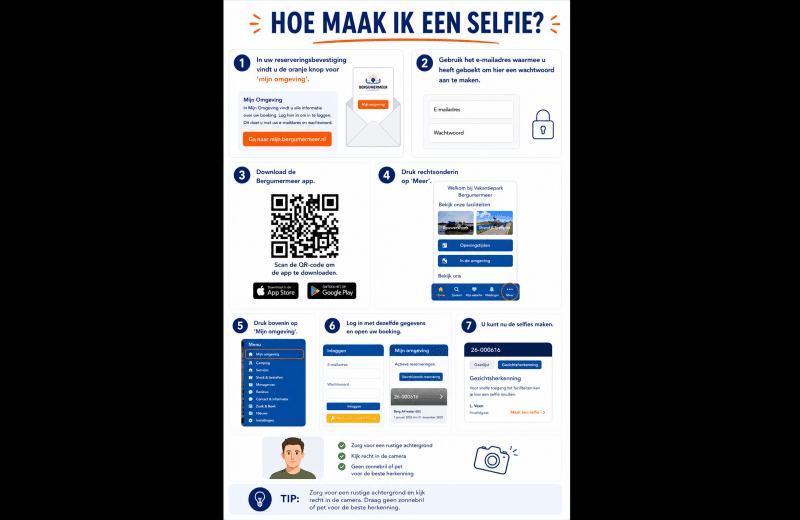
Creating login details for the app:
- In your reservation confirmation, you will find the ORANGE button for 'My Account' at the bottom. Click on this and then create the login details.
- Click on your reservation.
- Add your guests so that they can also be found in the app.
- You can then log in to the Bergumermeer app using the same details.
How can I upload photos?
- Open the Bergumermeer app and ensure you are logged in (the confirmation email for your reservation explains how this works and describes the steps above)
- Go to ‘Menu’ in the bottom right corner of the screen
- Click on ‘My area’
- Go to your reservation
- Add your fellow travelers
- Go to ‘Facial recognition’ and upload a photo of yourself and your fellow travelers
More information?
Click here and view the privacy statement.
Toegang
Toegang tot het zwembad en het indoor speelparadijs werken met gezichtsherkenning. Deze toegangscontrole werkt hetzelfde als het ontgrendelen van uw telefoon met uw gezicht. Op deze manier krijgt u een snelle en gemakkelijke toegang tot het zwembad en indoor speelparadijs.
Zorg ervoor dat u voor aankomst de foto's van u en uw medereizigers heeft geüpload in De Bergumermeer app. Dit kan 7 dagen voor aankomst. Zo kunt u bij aankomst gelijk gebruik maken van onze faciliteiten.
Inloggegevens aanmaken voor de app:
1. In uw reserveringsbevestiging vindt u onderin de ORANJE knop van Mijn omgeving.
Klik hierop en maak vervolgens een wachtwoord aan.
2. U kunt vervolgens in de Bergumermeer app met dezelfde gegevens inloggen.
Hoe kan ik foto’s uploaden?
2. Ga naar ‘Menu’ rechtsonder in beeld
3. Klik op ‘Mijn omgeving’
4. Log in met hezelfde email en wachtwoord.
5. Ga naar je reservering
6. Ga naar ‘Gezichtsherkenning’ en upload een foto van jezelf en je medereizigers
Meer informatie?
Klik hier en bekijk de privacyverklaring.
Uw privacy staat voorop: er wordt geen foto opgeslagen. De scanner zet uw gezichtskenmerken direct om in een beveiligde, versleutelde code. Deze code wordt alleen gebruikt voor toegang tot onze faciliteiten.